
Leaderboard



Popular Content
Showing content with the highest reputation since 01/29/26 in all areas
-
UPDATE 1.2T CHANGELOG 1. Fix Custom Jewel 2. FIx Harmony Dissapear after switch 3. Missing Option Level Damage 4. Block attack on teleport with config 5. Added Summon Book 6. Live Debugger ItemPositionItem 7. Level 400 Items fixed, was added fake lvl extra before 8. Fix Custom Pet position X/Y 9. Wrong description Wing level 3 chaos mix 10. Custom Bow Position Fix 11. Fix CustomNpcName 12. Fix Custom Jewel section 3 13. Fixed Bless/Soul/Life on CustomWings 14. Fix Custom JEwel and Custom Wings 15. Added Triple Damage on item option 177 number 16. Fix Double SHow level item in quests 17. Dissapear Pets while attack on 5sec and back 18. Added Auto Potion 19. Fix Dark Horse on attack animation 20. Fix Warp Master Class events 21. FIx Kalima 7 ticket xshop 22. Fixed bug related to point 17 23. Custom Map wrong name reading text.bmd 24. Block Pets CC custom + war inside it 25. Fix positions related to point 18 26. Fix Confirm Item Sale reposition text 27. Xshop Info Item Window missing buttons when Use 28. Any effect item Xshop use reposition and missing buttons 29. Party Control show tripple arrows changed to plus buttons with hover 30. Durability icons text following mouse fixed 31. Reorganize window Appoint Guild Position 32. Reworked Menu (U) to MuDream Interface 33. Reworked MasterSKillTree Window MuDream Interface 34. Reworked Inventory Jewel MuDream Interface 35. Rework Personal Store Name/Text MuDream Interface 36. Added Ruud Inventory MuDream Interface 37. Reposition Location this one below MENU button UI 38. Pet Window Tabs MuDream Interface 39. Quest Window Tabs MuDream Interface 40. Interface MuHelper some adjusments MuDream Interface 41. Fixed, HardwareID, IP Connection not release when player get out of the game 42. Reworked Party Window MuDream Interface 43. Map Name Image +50px Y 44. Notice on window what its important to hide, its hidden now. 45. Added Close buttons Guild, X-Shop in right corner 46. Guild Warehouse Storage Open/Close Text reformat to 1 line 47. Item Market little upgrade design, and some corrections 48. Quest System Window Rework MuDream Interface 49. Added Mini Info Quest Interface MuDream 50. Fix Maria (Guardian Angel) Double Absorb and not show redu in Character Stats 51. Combo Config per Class 52. Combo all class PvM config 53. Update Custom Item Market - new settings 54. Fix Custom Pet Reduction Show in C Panel Statistics 55. Added missing Gift button X-Shop 56. Fixed ping, now measures is real 57. Update design Personal Shop (type 0) MuDream Interface 58. Block resize window of game client by mouse 59. Fix Combo show for other players 60. Update of NPC Ruud Shop, added restriction to buy and maxbuy count 61. AUTO_CTRL disable on open Inventory 62. X-Shop fixed giving gift 63. Fix Master floor Events 64. Fix Reset Panel wrong name Ruud 65. When you equip Dark Raven and unequip than skills Raven not dissapear 66. Fix Chaos Castle/Blood Caslte/Devil Square result message 67. Resize Tooltips, use better it free spaces to compact it 68. Some update into Chat window MuDream Interface 69. Added configuration resist Jewelery 70. Fix Pets stuck animation 71. Fix Trade ItemRank when its disabled 72. Fix UI PartyFind, commeted box Helper, and corrections to Chat/ChatLog 73. Fix Crash Dump 74. Fix Chat Position and resize above 5 lines 75. Fix HP, Health MuHelper 76. Fix Guild Button and Sub show in Guild (fix show 8 when char is offline) 77. Fix DevilSuare Ruud Coins reward + procedure clean EventCoins 78. Fix Ancient SetItemDrop EventBags 79. Fix SetParty, Offhelper autodc, Fix Divide zen Party 80. Defense not calculated if its higher level + 81. Requirements stats in items not calculate good 82. Requirements stats fix 2 final 83. FPS add 60/120 in Menu options, some update in design Menu Options 84. Scale Nickname fix 85. Exp Bar Update Tooltip show EXP full information about rate 86. Color Zen Inventory 87. Reconnect party, sync with DB SQ, width/height fixed buttons follow party/start helper 88. Increase Event List Timer invasion up to 40 index 89. Fixed Moving on another window with another character 90. Config Helper button 91. Tooltip Inventory buttons/ Character 92. Regression Right click mouse to point 10. fix 93. OffTrade, OfflineHelper Reconnect 94. Party Exp Update, Added Master Party Exp and some changes with details information 95. Fixed NPC ItemRank 96. Party Control update disable/enable moved to MainInfo.ini 97. Check All Classic Interface/Downgrade 98. Adjust the duration of the elf's buff in the master skill, specifically the defense and attack auras. Currently, each point of improvement adds 1 second; this should be changed to 1 point = +30 seconds for each point. 99. Restriction so that players without the required reset or grand reset couldn't attack mobs, so that I could set the monster list to only allow attacks from players with resets or grand resets 100. Added Monster Respawn Time 101. Block attack monster against the wall 102. HPBar MuDream background missing added 103. Skill List MuDream Interface updated 104. Nickname PK/Hero colors missing added 105. Update Menu Type 2 MuDream resize + added switch enable/disable working features 106. Update Mining System Interface 107. Fixed Registration Panel 108. FIx Reload Monster GS 109. Updated Classic and Downgrade Interface 110. SetItemOption Custom in My Info Character Panel Fix 111. Flag Options adding fixed 112. Energy Elf could simply click the party members name the party list to cast buffs 113. Fix buff icon spacing tracing in one line7 points
-
Hi guys 💚 Im love to share with you some piece of work, and what we can expect from upcoming PATCH for BETA 6. a) BETA 6 FIX 1. When you used quick add stat then put the number and press OK you get disconnect 2. Trade - Wrong position Level Character - When you place an item in the trade window and remove it, then quickly put it back by clicking fast, the item bugs out and disappears. You can’t see it or move it, but the person you are trading with can see it. 3. HelperOffline - Player stay and not attack monsters - After relog he have always teleport effect and Miss from before attacked monsters - Propably Range not good working for attack skills 4. Attack Monster - Damage font is cut first number/Miss cutted - When you attack monster the ping increase alot 50 to 90 its problem with FPS system 5. ItemRankSystem - MapManagerItemRank.txt its like not work - Special Options do nothing, not increased nothing - Jewel use/CustomJewel use remove options rank - Trade problem - Mythical and Legendary Items on the Market Legendary and mythical items lose their rarity when they are put up for sale on the market. - Rarity in chaos machine When you add an item of any rarity to the Chaos Machine, you don't see the rarity, but you also don't lose the rarity when refining; it's just a visual thing. - Zen drop Zen falls to the ground and is seen through the rarity system. It would be good if Source limited it to not obtaining any rarities. 6. Personal Store - When BK have 2 weapons in hands and u try 1 put in store, than second automatically disappears, after switch it is back and sometimes bugged, that was impossible to take back item from store, i tried select serv, close main and open again but no sense, finally i restarted completly game server and fixed. - When i put item in store i cant take it back in inventory (check if need close store) 7. Interface UI/Scenes - Downgrade need do reposition Quick Add Stats - Becasue Dragon Head Left, not see Chat - CustomLoginScene = 3 CustomcharacterScene = 3, Cant see the character, need check - Double background on RenderitemName on the ground drop (only on items, on zen is good) 8. Player, Animation, Effects - The Elf's stance is incomplete when holding a weapon. (Player.bmd problem) - Some effects look like glass or crystal, some flashes or visual effects look square like the wings, the Inner of the BK, the shine of the wings. - When I pick up the piercing armor, it disappears while I'm clicking to move it in the inventory; when I release it, it reappears. When it's put on the market, the texture isn't visible either. - Position in which they hold the weapons Some characters like the BK and the RF, tested so far, hold 1-handed weapons and fists as if they were 2-handed. 9. ItemMarket - Wrong position for jewels price b) BETA 6 SUGGESTIONS 1. Exclude specific items from the rarity system - Add a way to exclude specific items from the rarity system. 2. Invasion Button - Make it smaller, resize it to size of included font 3. Party Control - Add the party control system. Party control allows you to make all party members follow you; some even have the ability to make companions attack. 4. Button Quest Active - Rotate that button for 180 And will be included also changes to ItemRankSystem, what we are working on, to make that system perfect 💗7 points
-
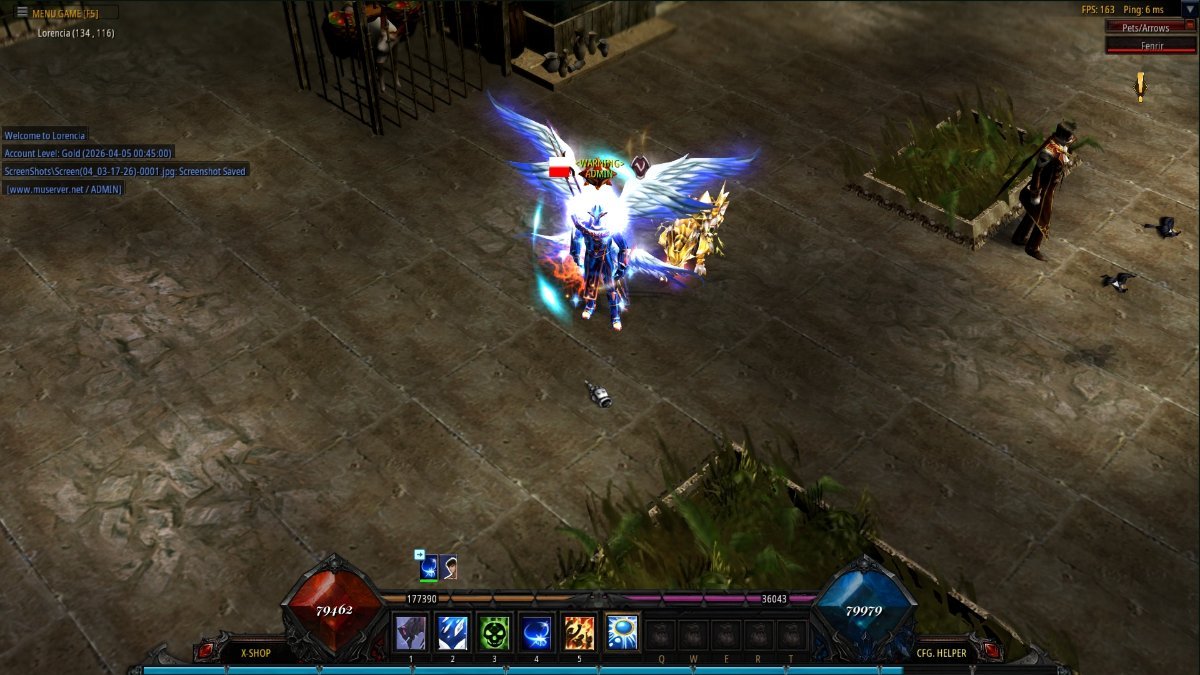
UPDATE 1.1 We are continuing to work on further improvements to deliver the best possible and most visually polished product. We are putting a great deal of effort into refining both the design and the overall user experience. However, despite our best efforts, the engine itself has certain technical limitations that prevent us from fully adapting every window, panel, and interface element to all possible screen configurations and display variants. **For this reason, we strongly recommend testing and using all features in the default recommended resolutions, where the product is intended to look and perform at its best:** - 1920 × 1080 with a 15px font size - 1240 × 1080 with a 14–15px font size Unfortunately, it is not possible to optimize every interface and window for all hardware setups, resolutions, scaling options, and font size combinations. Our priority is to ensure the most consistent, clean, and visually balanced experience within the above universal settings, which currently provide the best overall presentation of the product. We appreciate your understanding and patience as we continue improving the project. Our goal is to make the product as refined, functional, and visually appealing as possible, while working within the technical constraints of the engine. Engine: - Backend optimizations for crowd control and FPS reduction with large amount of enemies - Backend optimizations for skills usage with high attack speed to reduce throttling and GPU/CPU consumptions - DOF and FXAA optimizations for better performance - MSAA discontinuation as it's being heavier then FXAA and giving worse result as intended Interface and positioning: - Fonts: - Moved back to the Bitmap atlas for fonts to minimize the FPS/GPu and CPu throttling issues - UI: - Added new GFX for Custom Menus like _Events, _Commands, _Ranking, _ResetSystem, _GrandResetSystem, _PremiumStore - Fixed issue with Reset and Grand Reset systems crashing the game-client with unconfigured/missconfigured config - Added NewUI for Lugard, repositioning for text and buttons - Added NewUI for Jerint, repositioning for text and buttons - Added NewUI for Julia Market Union, repositioning for text and button - Added NewUI (to test) for Ancient Gateaway at Kanturu Remains - Added small visual frame for Guild Icon just before character nickname - Added simple small bitmap frame on Guild Icon display above character name - Fixed Active Quest Popup window, fixed the buttons and positioning of text - Fixed the Quest System Window, fixed the buttons and positioning of text - Fixed the Ruud NPC for better style - Fixed Merchants title positioning - Fixed the general Guild Window, better switch button, better positioning - Fixed Guild Upgrade module: Added buttons, fixed scrollbars, better positioning - Fixed Gens Window title positioning - Fixed a bit Helper window with buttons and sub-menus - Fixed Seed Master and Researcher positioning and fonts - Fixed Lehap Jewel Combination positioning and fonts - Fixed Commands Window a bit (rebuilt), fixed scroll and added horizontal one - Fixed "My Quests" window under "T" hotkey, added buttons there - Fixed positions in common information boxes like BC/CC/DS/Helper and others - Fixed Quest System hover turning off part of HUD - Fixed tooltips for item rewards in Quest System - Added NewUI background for Quest System - Fixed Personal Shop headchat to show in single line - Fixed Ruud Shop windows positions, smaller button and better renders positioning - Fixed chat bubble above the character to dark - Added NewUI to Pet Trainer, repositioning for text and buttons - Fixed positions of elements in Chaos Machine - Fixed positions of elements in Item Rank NPC - Changed "Item Rank NPC" to "Item Rank Manager" - Fixed viewport exchange and visuals/glow for reequipping items with glow or wings - Added NewUI login window, changed some positions - Added NewUI register window, changed some positions - Optimized Render Font - Fixed PING from FPS separated - Fixed Giant/Dark Mammoth render chrome on back - Fixed Death Beam Knight render bones - Fixed Titus from Vulcanus, fire effects and others - Miss cutted `M` fixed Some more - Fixed Ancient Options, Crash, effect blue aura - Fixed Quest Window double frame bottom - Fixed Login Save Account CheckBox - Fixed Ranking on last slot gone HUD - Added a new configurable HUD setup through MuServer/Tools/MAIN_INFO/Custom/CustomHUDConfig.txt, including custom font-based number rendering, stat text spacing, background options, and input text color settings. - Added a new configurable inventory tooltip border system through MuServer/Tools/MAIN_INFO/Custom/CustomTooltipBorder.txt, with separate style sections for Common, Jewel, Harmony, Rare, Epic, Mythic, Legendary, Excellent, and Set items. - Added a new configurable ground tooltip border system through MuServer/Tools/MAIN_INFO/Custom/CustomTooltipGround.txt, allowing dropped item tooltips to use their own visual style independently from inventory tooltips. - Added a new configurable ground item effect system through MuServer/Tools/MAIN_INFO/Custom/CustomItemGroundEffect.txt, covering Rare, Epic, Mythic, Legendary, Harmony, Set, Excellent, and Jewel drop visuals. - Added a new per-section font styling system through MuServer/Tools/MAIN_INFO/Custom/CustomRenderFont.txt, covering chat, notices, head chat, tooltip text colors, and item requirement text. - Added a separate item comparison toggle in MuServer/Tools/MAIN_INFO/MainInfo.ini under the [Interface] section: ToolTipItemCompareShow. - Kept the dropped-item tooltip toggle in MuServer/Tools/MAIN_INFO/MainInfo.ini under [Interface]: ToolTipItemDropShow. - Added runtime enable/disable switches in MuServer/Tools/MAIN_INFO/MainInfo.ini under [Interface] for the new customization systems: EnableCustomHUDConfig, EnableCustomTooltipBorder, EnableCustomTooltipGround, and EnableCustomItemGroundEffect. - Added a runtime toggle for the new main menu in MuServer/Tools/MAIN_INFO/MainInfo.ini under the [Custom] section: EnableNewMainMenu. - Improved customization readability by moving these systems to named config sections and human-readable key/value format, making them easier to edit without touching the client code. - Kept backward compatibility for older config layouts, so legacy versions of these files can still be read if needed. - Fixed Jerridon and Osbourne title positioning - Fixed XSHOP Msg. box positions - Revised the login panel and register panel, disabled yellowish overlay and changed the GFx - Fixed Storage arrows from Pega to original one as they're better looking - Fixed Storage page title position to fit better - Revised PIN windows - both, confirm and verify in storage - Revised Password windows - both, login and lock/unlock - Moved the Item Market Window a bit to the top so narrow resolutions would use their full-atmom powered machines to see it on the full screen - Fixed Item Market Window bottom buttons a bit to the top and moved the [X] button to the right place - Resized Guild logo and Gens Icons above the char. head to make it more compact and modern Some new things - Fully configuration font system - Fully configuration animations tooltip system - EventEntryLevel can change all floors, even disable/enable Master floors - EventEntryLevel Icosn, restrication by Invite/no invite/move - Damage top hit interface - Items restriction with Master Level/Reset/Grand Reset - Helper circle Range - Loading Screen new - HealthBar MuDream add SD bar - Scene S8 Login Fixed - Added Scene S8 - Added CSetEffect - Added Mining System Its still in shorts changelog, inside its alot of more changes etc...6 points
-
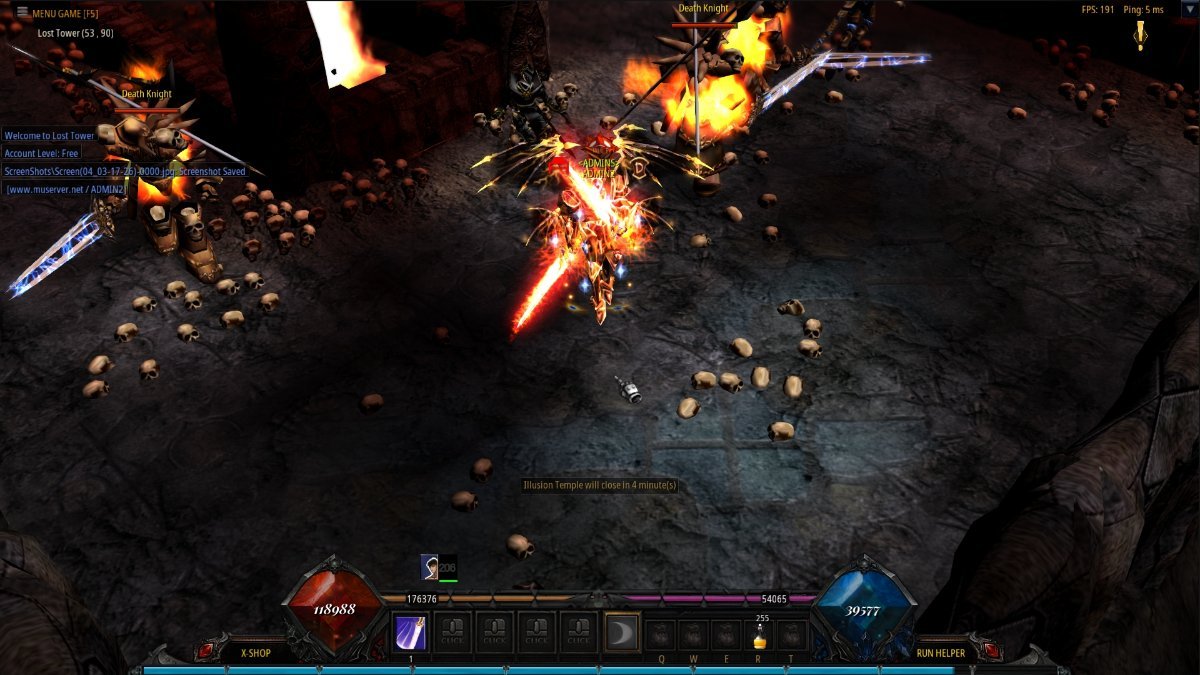
Dear Players! We would like to remind you that the recent update was a highly complex process. As a result, you might still encounter both old and entirely new bugs in the game. We want to be clear: this is not our final production version yet. It’s a transitional release laying the groundwork for upcoming features. Thanks to these changes, our MU will soon not only run much smoother but also look a lot better. Thank you for your patience! - Engine: Partially migrated from OpenGL Legacy to OpenGL 3.3. This improves overall performance, stability, and enables modern rendering features. - Engine: Fixed various issues with new engine being clanky for AMD and Integra a'ka iGPU's - Engine: Migrated from ancient and outdated font and bitmaps rendering for modern font render with shadow and proper visuals, every part of the game should now be based on new font render engine. - Engine: Implemented Alpha/Fade Culling for NPC's, Monsters and world objects. You'll be no longer bombed with instantly showing/spawning elements but instead all the objects will be preloaded in longer distance with alpha and be shown smoothly instead of instantly. - Engine: Implemented and modified post-processing based on new OGL 3.3 - DOF - Depth of Field is now blurring the world and objects at the longer distance - FOG - Fog is now moved to new logic and it's now working on objects, models, world and particles - Engine: Tons of fixes and tweaks for performance, including fixed in-game graphics level switch - Engine: Reimplemented FXAA support for med-end users to improve edge smoothing for all world objects and models - HUD: as per above, reimplemented font and as we choose the new font - it will be condensed/narrow to fit as much as possible to not destroy any kind of UI elements - HUD: separated HP/Mana from SD/AG and Stack/Skill numbers, so they're now using different logic thanks to which we can choose different font style or size for each part of UI - HUD: changed the bitmap numbers for damage given and taken for real font render with unique font stored in `/Custom/Fonts/damage.ttf` - HUD: changed the bitmap numbers for HP and Mana for real font render with unique font stored in `/Custom/Fonts/hud.ttf` - HUD: AG and SD along with stacks and skills are using global defined font - HUD: Reimplemented some windows and buttons logic and code for scaling conversion to make this game look a bit better - Features: Added new animated items borders with special effects for Excellent, Harmony and Sets (exterior of window border effect) - Features: Added new animated items borders for tooltips with special effects for ranked items like Common (no frame), Rare, Epic, Mythic and Legendary (interior of window border effect) - Features: Added new animated jewel items tooltips. - Features: New item frames mix and hybrid. If items is Legendary Excellent then both effects will be applied on tooltip window making it looks even more powefull - Features: Added rpg-loot visuals for items with special suffixes like (Common) Excellent (green beam with particles), Harmony (heavy blue particles), Set (Heavy magneta particles) and also for gear levels, for every of their color but Mythic and Legendary should have special spiral beam effect and Jewels are showing `blink-blink` effects - Ancient problems: Partially fixed Icarus rendering and blend overlapping for Sky, Clouds and Monsters - Ancient problems: Red and Golden Dragons should no longer disappear in middle of flight and also render should fade from starting smoothly from starting position. - Interface: Partially reimplemented Pegasus theme for interface and buttons with some of positioning - Interface: Reworked the main HUD with skills to looks and feels better (better quality image) - Interface: Changed the Move/Warp window to fit the rest of interface flow - Fix Helper when you close main and helper is run, than when you return helper cant use - Fix Helper Offline item pickup from list - When Party Leader Die unfollow - CRenderMesh fixed - CustomCloak fixed - CustomMonsterEffectStatic/Dynamic fixed - CustomMonsterGlow fixed - Active Quest Disable/Enable - Fix Durablitty Item Value rate And much more! ❤️
 6 points
 -
Dear community of @everyone , We are doing everything we can, and we truly ask you to trust us when we say that our "two man army" team is 100% dedicated to making our beloved early - era seasons - especially Season 6 - as polished, enjoyable, and satisfying as possible for every single admin and client. We read every bug report, every post about visual issues, every comment, and every piece of feedback you share with us. Every section is being carefully monitored, and from the bottom of my heart, I can assure you that our goal is to finally make this game better - without spending thousands of dollars on overpriced files or even more on the work of so-called developers who do not truly deliver quality. This is not an easy task. Thank you for your support and your trust. Please know that every report and every private message is read, recorded, and considered for implementation as a potential fix or improvement. Not much time has passed since version 1.0, but even so, we are doing our best to balance real life with our commitment to giving you something that, in many cases, you simply cannot achieve on your own without deep knowledge of code or configuration files. We are trying our absolute best, and please believe us when we say that we will not abandon you. Some delays or missed replies to your posts are not forgotten - quite the opposite. We want to give each of you the opportunity to enjoy the game the way you want it to be. Stay with us, support us, and with our small brush, we will create unique files and content that cannot be found anywhere else - not for thousands of dollars, but simply through the support that helps us maintain our servers and tools. We love you all!5 points
-
UPDATE 1 [BETA 10] Changelog - [FIXED] Trainer Mix - [FIXED] Party - follow party leader on warp - [FIXED] CustomNpcRankSystem.txt Section 1 DIsable/Enable Tabs - [FIXED] MapManagerItemRank.txt Section 0 Disable/Enable drop common - [FIXED] Helper AutoPotion is reseted to 0 when you warp to other Map - [FIXED] All Sets Lucky dont have Glow - [FIXED] Chaos Castle not working at all - [FIXED] Sockets options gones after switch character - [FIXED] Seed Mix add to socket nothing do ItemMarket 1. Disabling Item Market now disabled it fully, with CTRL+SHIFT send item to market place 2. It have rollback now, like Chaos Machine, to not lost item on DC. (Dupes not working guys, but you can check:) 3. If Close the window, or change the tabs and have item in slot, item will back to inventory. Show Mini Pet in Town - There is possible to show mini pet in town, with options of Scale and each Type of CustomPet - There is possible to show mini pet in town, with options of Scale for all existing mounts/pet Downgrade Interface - [FIXED] If you clicked on Party Bar than cannot attack monsters/players, only helper works - Now appear also Party Control in Downgrade, but you you can disable it any time in GameServerInfo - Common.dat - Party Leader change is here now Auto CTRL - Double-press CTRL and check system chat for "Auto-Hold CTRL: ON" - Quest System by Class and generated test 10 episodes 100 quests per episode - Advanced Stats now have all item rank options, what can be see correct names and values of ItemRank3 points
-
MuServer.NET — License Terms & Purchase Agreement 1. Agreement By purchasing any product or license from MuServer.NET, you confirm that you have read and agreed to these terms. This agreement becomes legally binding immediately after payment is completed. 2. Digital Product Policy - All MuServer.NET products are digital goods. According to international digital commerce regulations: - Digital products are non-returnable - Digital products are non-refundable - Delivery is considered completed once the license is issued 3. No Refund Policy - ALL SALES ARE FINAL By making a purchase, you explicitly agree that: - You waive any right to refunds - You will not request payment reversals - You understand the nature of non-tangible software licenses 4. PayPal / Payment Disputes - Opening a PayPal dispute or chargeback violates this agreement. Any attempt to reverse payment will result in: - Immediate license termination - Permanent ban from MuServer.NET services - Blacklisting of customer account and server - Revocation of all access without reinstatement This policy is accepted during purchase and serves as proof of service delivery. 5. License Ownership - License is issued to the original buyer only - Resale, sharing, or redistribution is strictly prohibited - One license = one server instance Violation results in permanent suspension. 6. Acceptance of Terms By completing payment, you acknowledge that: - You fully understood what you are purchasing and agreed to these Terms of Service. - If you do not agree with these terms — do not purchase. This message serves as the official Terms acknowledgment for all transactions.3 points
-
🛠️ MU Server – BETA 9 UPDATE 1 Changelog: 1. ItemRankSystem - Rank/rarity bonus stats shows as % instead of flat value, so we changed our Tooltip read options like reading it original Excllent/SetOption/MasterSkillTree Options - Fixed Bonus Mastery Option - Chaos Machine The result of the mix to +10, +11, +12, +13, +14, +15 does not show you the rarity of the item until you place it in the Inventory Thats why ItemRank now is rewrited some mechanics to make it like original special options, without any dalays on tooltip or something strange things. 2. Resolution Change in game - Party Window - Guild Make Window - (U) Menu Window Reported 3 window, but its not fully you know guys? Thats why i make one function what reload fully UI Set Positions. So problems is gone now with reposition. 3. The Boss health bar - Enabling the boss health bar makes the tooltips of items on the ground much larger. Yes fixed. 4. Chat - using the downgrade interface if you press the F keys it will mess up the chat making it dissapear and it wont come back like in the s6 interface it just stays like that no matter what - Key F2 bug chat, yes fixed. 5. CustomMenuType - ; Settings (CustomMenuType) ; 1: Render Type texture logo this option will render the logo but is not usable, clicking does nothing, and if you use option 2 to render the button with the helper then it does not even show anything it should be next to the helper buttons ( im using downgrade interface), yea its all good now. 6. Check ImagesMap CustomMap.txt MainInfo, confirmed, its was missing one call. Fixed - Translated LuckyItem David NPC BETA 9 Suggestions 1. ItemRankSystem - Enable/Disable option to show Excellent in Name and Name on the ground items - Using an NPC that charges any coin we want that allows us to re roll the values on our rankitem stats so we can upgrade our items ranks like going from common to rare to epic by consuming coins, giving it rates of failure or even rates of going down instead of up. ( this would be a nice way to spend coins and upgrade the items ) 2. Disable/Enable 380 options in Chaos Machine button, not at all guys, i make alot of downgrade options separated key/button/system disable 3. Selling high-value items with right-click - Add alert when selling high-value items with right-click. Yes its done 4. Quick Add Stats Panel with Auto Add stats [DONE] - Quick Adds stats by middle mouse button on plus stat buttons (quicker adding stats by hold MMB) [DONE] 5. ConnectMember allowed list to connect [Done] 6.. CustomMonsterKill Count 7. LauncherType 2 and Launcher Name LauncherType 1 is Updater.exe 8. MD5 + CRC protection server side 9. Secure all item rank ways to possibility dupes 10. Font Damage Colors3 points
-
Keep up the good work @Pyke2 points
-
Very NICE !!1 point
-
Incredible work! Thank you!1 point
-
Much love for you, guys, you rock!!!! 💓1 point
-
1 point
-
This is amazing! Thanks, guys. ❤️❤️❤️1 point
-
This isn't nice. This is amazing! Thanks, guys. You've done a really great job! Glad I met you.1 point
-
Nice work mate1 point
-
1 point
-
Perfect & hello :)1 point
-
I'm really looking forward to it!1 point
-
Nice bro!1 point
-
🛠️ MU Server – BETA 7 Update We are proud to present BETA 7, a major stability and gameplay polish update focused on fixes, system corrections and quality-of-life improvements. This patch resolves critical gameplay issues, visual inconsistencies, server-side logic problems and introduces multiple usability enhancements. 🔥 BETA 7 – FIXES 1. Quick Add Stats Fixed disconnect issue when entering value and pressing OK in Quick Add Stats. 2. Trade System Redesign & Fixes Fixed incorrect character level position in trade window. Fixed critical trade duplication/visual bug: When placing an item into trade, removing it and quickly putting it back, the item could disappear visually. Trading partner could still see the item while the owner could not move or see it. 3. HelperOffline Fixed issue where player was staying idle and not attacking monsters. Fixed relog bug where teleport effect and previous “Miss” damage was replayed. Fixed incorrect skill range detection for attack skills. 4. Attack Monster Fixed damage font cutting first digit (including Miss text). Fixed FPS system issue causing ping increase from ~50ms to ~90ms during attacks. 5. ItemRankSystem – Major Fixes Fixed MapManagerItemRank.txt not applying correctly. Fixed ItemRank options not increasing stats. Fixed Jewel and CustomJewel removing ItemRank options. Fixed trade disappearing issue with ranked items. Fixed Mythical & Legendary items losing rarity when listed on the market. Fixed Chaos Machine visual bug where ItemRank options were not visible during refine. Fixed Zen drop incorrectly interacting with ItemRank system. Fixed Warehouse visual bug where normal items appeared as Excellent if ItemRank items were present. 6. Personal Store Fixed BK dual weapon bug where second weapon disappeared after placing one in store. Fixed issue where items could not be taken back from store inventory. Resolved server-side lock issue that previously required full GameServer restart. 7. Interface UI / Scenes Repositioned Quick Add Stats after downgrade adjustments. Fixed chat visibility issue caused by Dragon Head UI overlap. Fixed CustomLoginScene = 3 / CustomCharacterScene = 3 not showing character. Fixed double background rendering on ground item names (Zen unaffected). 8. Player, Animation & Effects Fixed incomplete Elf stance while holding weapon. Fixed glass/crystal square visual artifacts on: Wings BK inner glow Various shine effects Fixed item disappearing visually while dragging (Piercing Armor case). Fixed missing texture when item listed on market. Fixed incorrect weapon holding positions (BK & RF holding 1H weapons like 2H). 9. Blood Castle Fixed root cause of MonsterSetBase section 4 spawning issue. Monsters were spawning on blocked attributes (4/8) tiles. Front-line monsters no longer spawn frozen and inactive. 10. ItemMarket Fixed incorrect jewel price position. Temporarily disabled model price display. 💡 BETA 7 – SUGGESTIONS IMPLEMENTED 1. Rarity System Added ability to exclude specific items from rarity system. 2. Invasion Button Resized and optimized to match font size. 3. Party Control System Added party follow system. Party members can follow leader. Companion attack support. Added Party Leader Change feature. 4. Quest Active Button Rotated button 180° for better UI alignment. 5. Jewelry Bank Shortcut Added keyboard shortcut: press J to open Jewelry Bank. 6. Quick Sell Added right-click quick sell when store is open (higher season style). 7. Party Search Redesign Redesigned Party Search interface for improved usability. 🎯 Summary BETA 7 is focused on: Stability Combat system correctness ItemRank reliability Trade & market integrity UI polish HelperOffline reliability Animation & visual corrections Party system improvements This update significantly increases gameplay consistency and server stability.1 point
-
BETA 6 1. Rework of Item Rank System - Its now separated from Excellent, its like new options - It have now 2 extra option Mastery - Base Score and Gear Score fully configurable - Added config to EventItemBags for possibility drops Rank options - Added config to QuestSystem - Added config to CustomJewel, with possible upgrade our options with Custom Jewel - Added new config MapManagerItemRank.txt something like MapManager.txt for ItemRank with easy option disable/enable - Added new sections config to ItemOptionRate for make and drop command, EventitemBag control, MapManagerItemRank control and Quest System - Added new config ItemRankOptionRegistry.txt, where can see and setup all options for Item Rank, included even MasterSkillTree options - ItemRankSystem.txt more configs, and fully readable all from server side, dont need touch client side. - Supporting whole systems in game, like Warehouse/PersonalShop/Trade/ItemPost/ItemTooltipDrop etc. - Item Name on the ground is show Rank item now 2. Little Rework of Quest System - Added Active Quests Window - Added Icon pulse on activity quests to open - You can disable icon in Option Panel -> Other - Also if QuestSystem is disabled, icon is gone, its normal. - Checked 100 scenes with 100 episodes inside, ok it was copy paste, but its working, no limits 3. Active Invasion Redesign/Rework - Changed to frame button open window with pulse little frame of it, to see it more - Window redesing and if you will click on line with monster name, than will popup window with model monster - WIndow movable and detecs position to make model monster window left or right - Options in model monsters window show - + Zoom and can rotate model, and it have 4 random animations on click/open 4. Notice Update - Now Notice.txt settings fully works, with colors change - Its now pulse like 5. Show ToolTip drop on the ground hold SHIFT to see 6. Item Market redesign/rework - Fully working with Item Rank - Added buttonss buy and take and window popup on Buy - Fixed drag and drop item to sell - Right click if window Item Market is visible and Sell, than Right click and sell - still hold SHIFT+Right click on item on Inventory force open Item Market 7. TrayIcon replaced for something nice - Added to minimize icons of each Class - Added to minimize icons of each Class circle in right bottom position yellow if have max level character 8. Added ExperienceFormula.txt - Fully configurable Experience formula controlled only in server side, with is possible set max level to 65k now - because of this, feeling with something wrong with exp is gone 9. Migration from Opengl 1.1 to Opengl 3.3 core profile - its like now core things 70% done - all if we meaning up to core profile its done like 30-40% - i leave here stable version in this update 10. FPS System Update - now not explodes Effects like Flame or Smoke or other weird things like before - possible to smoother game now 11. PostProcess Effects Updates - Now its fully of options in config.ini like you can setup it on live in Option Panel -< Graphics, all will save it to config.ini - Added 3 presets - Config i setup default now, so need to adjust it 12. Fully recoded Offline Helper - Rebuild to most possible simillar code mechanics like on client side - Now fully working with save all the things 13. Zen drop show - now its depends how much of dropped zen than is more zen visible - so its show like in original, but its most optimized with large ammounts 14. Quick Add stats - if you see in Character Panel tooltip in mouse position like you have base stats, so tooltip will appear Quick Adds Stats click on it to make input box with you can add your stats quickly, its working with button OK, same like ENTER or Escape to cancel or click whatever in window to cancel. its taking your real stats so if you input more than you have, it will automatically set to max you have. And here we go with Fixed list of bugs below - [FIXED] Interface bugs, like Quest window Marlon - [FIXED] When you using downgrade s2/s3 you cant press or click the skill - [FIXED] No Excellent glow on items - [FIXED] Evil spirit hits monster wrong - [FIXED] Evil spirit hits die monsters still - [FIXED] No monsters in some maps and Event maps not loaded - [FIXED] Switch to CharacterScene = 0 (Classic) characters are gone - [FIXED] Custom Pet Effects visual error - [FIXED] There is bug in dismantle of jewels in LAHAP NPC cant dismantle 10x bundle souls etc. - [FIXED] Some of DL skills don't show real stats that you need to use them. - [FIXED] Elf Orbs 0 energy requirements - [FIXED] All bows have problem with position - [FIXED] Elf Skill "Infinity Arrow" not buff in OffHelper Mode, each time I re-login, Elf character always consume all arrow/bolt I store in inventory. - [FIXED] MasterSkill: Weapon Fury (DK, MG) not working, put some points on this skill, atk power and speed in Character Info not change. - [FIXED] If use >1 window, Normal work(without lags) Only 1 window, other windows in standby mode greatly slow down the picture. Use 2 and more window and you see this. - [FIXED] MuHelper Problem auto potion, and buff party settings not save - [FIXED] Some of items, like Cape of Lord cannot put bless/soul on it - [FIXED] Animation falling down character when Maya die are missing - [FIXED] Helper change requirement level crash gs, example wanna setup from 1 level1 point
-
Hello guys, BETA 5 upcoming this weekend! 31.01.2026-01 . 02.2026 Changelog UPDATE 1 [BETA 5] - Added PostProcess Shaders (config.ini) and new Tab in Option Panel with config in real-time - Added Music config in Option Panel - Item Market “My Sales” now requests the correct list (type 12) and refreshes periodically; “My Sales” is filtered by account+character name on the DataServer to avoid cross‑character bleed. - Guild join now checks actual guild status instead of name‑slot, fixing false “not guild master” rejects. - Quest System detail panel refreshes on quest updates (real‑time). - Guild Upgrade auto‑refreshes on action (real-time). - Inventory Extension Item Stack destination index fixed (was using wrong index gate). - Interface Classic resolution change: prevented override of char/inv button positions that was shifting two icons. - Set effects light fading sometimes: use gl_BaseInstance when available across instanced vertex shaders to prevent wrong instance data. - Inventory + Inventory Ext + Jewel Bank render models jewels dupplication fixed - Reload Monster sometimes freezing fixed, it was conflict with UI - Added Character Class x Class Reflect Rate Settings - Added Monster Common Settings and Top Hit Damage - Added show Zen/Coins in Trade UI - Added Korean, THAI and other languages support in Guild/Nickname [DataServer.ini] - Added Boss Healthbar Release of UPDATE 1 [BETA 5], will be the last of promoted files free! Rest is for Us, Premium Members 💗1 point
-
📌 PROJECT OVERVIEW This project is a custom-developed MU Online Server Emulator based on a fully DATA-driven and modular architecture ⚙️ All core systems are controlled via external configuration files, allowing fast customization, easy balancing, and future expansion without recompilation 🔧 The emulator is designed as a solid foundation for long-term servers, custom gameplay concepts, and professional MU Online projects 🚀 ━━━━━━━━━━━━━━━━━━━━━━━ 🔥 HOT FEATURES 🔥 ⭐ Quest System ⭐ Item Rank System ⭐ Reset / Grand Reset System Panel ⭐ Guild Upgrade System ⭐ Item Market System ━━━━━━━━━━━━━━━━━━━━━━━ 🗺️ QUEST SYSTEM A complete server-side quest system with full configuration support 🧩 Key features: ✔ Multi-episode quest structure ✔ NPC-based quest handling ✔ Kill and item-based objectives ✔ Configurable rewards ✔ Unlimited quest expansion ━━━━━━━━━━━━━━━━━━━━━━━ 🏆 ITEM RANK SYSTEM Advanced system for item progression and classification 💎 Key features: ✔ Rank-based item levels ✔ Server-defined parameters ✔ Easy balance and expansion ✔ Ready for PvE and PvP usage ━━━━━━━━━━━━━━━━━━━━━━━ 🔁 RESET / GRAND RESET SYSTEM PANEL Fully configurable Reset and Grand Reset system designed for long-term gameplay 🔥 Key features: ✔ Reset requirement control ✔ Point and stat rewards ✔ Separate Reset and Grand Reset logic ✔ Suitable for low-rate and high-rate servers ━━━━━━━━━━━━━━━━━━━━━━━ 🛡️ GUILD UPGRADE SYSTEM Extended guild progression system with upgradeable bonuses 🤝 Key features: ✔ Guild-level upgrades ✔ Configurable bonus values ✔ Encourages cooperative gameplay ✔ Strengthens guild identity ━━━━━━━━━━━━━━━━━━━━━━━ 🛒 ITEM MARKET SYSTEM Integrated item trading system with server-side logic 💰 Key features: ✔ Secure item trading ✔ Market-based item listings ✔ Controlled in-game economy ✔ Improved player experience ━━━━━━━━━━━━━━━━━━━━━━━ ⚙️ TECHNICAL HIGHLIGHTS ✔ Fully DATA-driven configuration ✔ Modular server architecture ✔ Easy customization ✔ Stable and scalable design ✔ Ready for future expansion ━━━━━━━━━━━━━━━━━━━━━━━ 🧪 PROJECT STATUS ✔ Core systems implemented ✔ Configuration-ready ✔ Production server capable ━━━━━━━━━━━━━━━━━━━━━━━ 💻 Project & Development: MuServer.net https://muserver.net
1 point





-0019.jpg.aabf8f94b3cf5f327e39d04d6b9a94bc.jpg)
-0018.jpg.5696f23313bf9d79f0659989c6c6415f.jpg)
-0017.jpg.b0849326754123eef2da2491e3c070b2.jpg)
-0016.jpg.856151011a9da2980b69766d93bd7abc.jpg)
-0015.jpg.b7f615de6896899a134fc9cb3660a492.jpg)
-0014.jpg.b01dc43bb1d63e7ab5acf542d884bba6.jpg)
-0013.jpg.92956a0210593bf3639719eb94ce3e25.jpg)
-0012.jpg.b17540cc860b22835b2112d9e214bdd5.jpg)
-0011.jpg.f6a489fa97f868eaf825b9eda48e7c39.jpg)
-0010.jpg.1787a325feef57f89c193e67c2ac8c1a.jpg)
-0009.jpg.a6763b233f424d3e0e7e367733334fab.jpg)
-0008.jpg.de2ec567953877cbcf0fe88a8ff21245.jpg)
-0007.jpg.90c63063a85b38aa50c5a0fa12e7665d.jpg)
-0006.jpg.4b74a5d50ca98c7274ab9d871f72638b.jpg)
-0005.jpg.b5fdd7fe80eafe68dd759f29517723d2.jpg)
-0004.jpg.ca648c195d6184f5b40b8d175e2a12d2.jpg)
-0003.jpg.592ea30782221d9bc047e6326e4610a4.jpg)
-0002.jpg.83b452f03ba54265a667d20c6e22b080.jpg)
-0001.jpg.08d564b67bafb923f82e0d85c3f50d8e.jpg)
-0000.jpg.9ad1e0332fa1e89f06d333059ff403d0.jpg)